Solutions
One workspace for every client store.
Run tests for many stores from one agency portfolio, with each client kept in its own workspace, roles for your team and reports you can share.
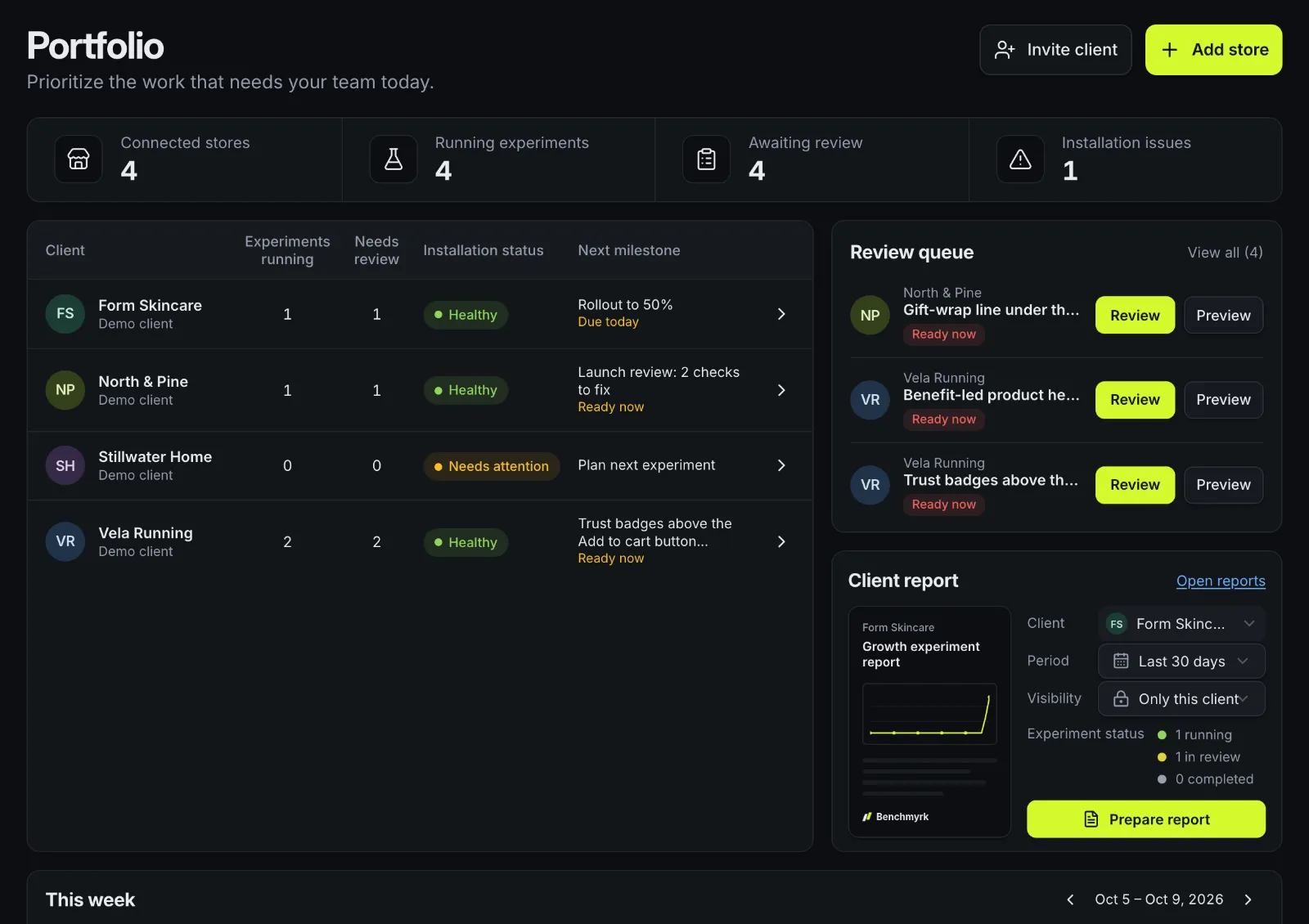
The whole book of clients on one screen
The portfolio shows what needs your team today, across every client you're assigned to.
Portfolio totals
Connected stores, running experiments, work awaiting review and installation issues, for all your clients at once.
Review queue
Launch approvals and decisions that are due, from every client, with a preview before you review.
Client by client
Experiments running, items that need review, installation status and the next milestone for each client, plus search across clients, stores and experiments.
Each client in its own workspace
Every client is a separate workspace with its own stores, experiments, goals, results and team. Being in the agency doesn't open a client by itself: each teammate sees only the clients they're assigned to.
Agency owners and managers add clients and assign teammates. Assigning someone to a client also takes admin rights in that client's workspace, and nobody can hand out a role higher than their own.
- Internal notes on an experiment are visible to your agency only, never to the client.
- Each client workspace keeps its own audit log of who changed what, and the agency keeps a separate trail of agency actions.
Roles for your team and your clients
Agency roles decide who runs the agency. Workspace roles decide what someone can do inside one client.
Agency owner
Everything in the agency, including adding owners and managers
Agency manager
Add clients, assign teammates to clients and add members
Agency member
Work on the clients they're assigned to
Workspace owner
Everything in one client, including billing, custom JavaScript and relaxing approval rules
Workspace admin
Workspace and site settings, team, AI budget and integrations
Workspace editor
Create, edit, launch and stop experiments; manage goals; run AI
Workspace viewer
See experiments, results and insights without changing anything
| Role | What it allows |
|---|---|
| Agency owner | Everything in the agency, including adding owners and managers |
| Agency manager | Add clients, assign teammates to clients and add members |
| Agency member | Work on the clients they're assigned to |
| Workspace owner | Everything in one client, including billing, custom JavaScript and relaxing approval rules |
| Workspace admin | Workspace and site settings, team, AI budget and integrations |
| Workspace editor | Create, edit, launch and stop experiments; manage goals; run AI |
| Workspace viewer | See experiments, results and insights without changing anything |
Reports for each client
Pick a client, a period of 7, 30 or 90 days and who can read it, then prepare a report. It covers experiment status, new experiment visitors per day, results with each variant's chance to beat control, and the decisions and learnings recorded in that period.
- "Only this client" reports can be read by anyone with access to that client's workspace.
- "Agency internal" reports stay with your agency and can carry internal notes.
- Every report is saved as it was prepared and has a print layout, so you can save it as a PDF from the browser.
How billing works for agencies
- 01
One plan per store
Each Shopify store has its own plan, priced on its own orders, and is billed through that store's Shopify account.
- 02
One workspace to run them
Your agency portfolio manages every client store, whichever plan each one is on.
- 03
Six or more stores
Talk to us and we'll set them up together. Stores on other platforms are priced per store.
Good to know
- The agency portfolio is built and tested on demo data; it hasn't yet been verified with an agency's live client stores.
- Inviting a client's own team records the invite, but we don't email it yet: share the sign-up link with them yourself.
- Comments aren't available inside the visual editor yet; they live on the experiment.
Questions
Can my client see our internal notes?
No. Internal notes on an experiment and "Agency internal" reports are visible to your agency only. Clients see the experiments, results and reports shared with them in their own workspace.
Does every teammate see every client?
No. Teammates see only the clients they're assigned to. Agency owners and managers who are also admins of a client assign people to it.
Who pays for each store?
Each Shopify store has its own plan, priced on its own orders and billed through Shopify. With six or more stores, talk to us and we'll set them up together.
Run your clients' tests from one place.
We'll walk through the portfolio, roles and client reports on demo data. Or install the Shopify app on a client store and start there.