Show each audience the version that works for them.
Target by page, device, country or Shopify Market, traffic source, behaviour, new or returning visitors, or Shopify data like the product and cart value.
Who you can target
The same rules work in tests and in personalized experiences, on the storefront and in the server SDK.
Pages
Paths, URLs and patterns to include, with exclusions that always win.
Device
Desktop, tablet and phone.
Location and Markets
Countries, regions and cities to include or leave out, Shopify Markets, and saved locations you reuse.
Traffic source
UTM tags and referrers, such as paid search or a newsletter.
Behaviour
Pages viewed this session, cookies, URL parameters and cart value.
New or returning
First visit or a returning visitor.
Shopify data
Page type, product, cart total and signed-in customers, read from Shopify as the page loads.
Language and time
The visitor's language, and the days and hours a change should show.
Audiences you build once
Save an audience, such as first-time mobile shoppers, and use it in any test or experience. Each audience shows its estimated size from your last 30 days of traffic, and an overlap view shows which audiences share visitors.
- Include and exclude conditions, combined with all or any.
- Changes to a saved audience reach every running test that uses it.

Personalized experiences, still measured
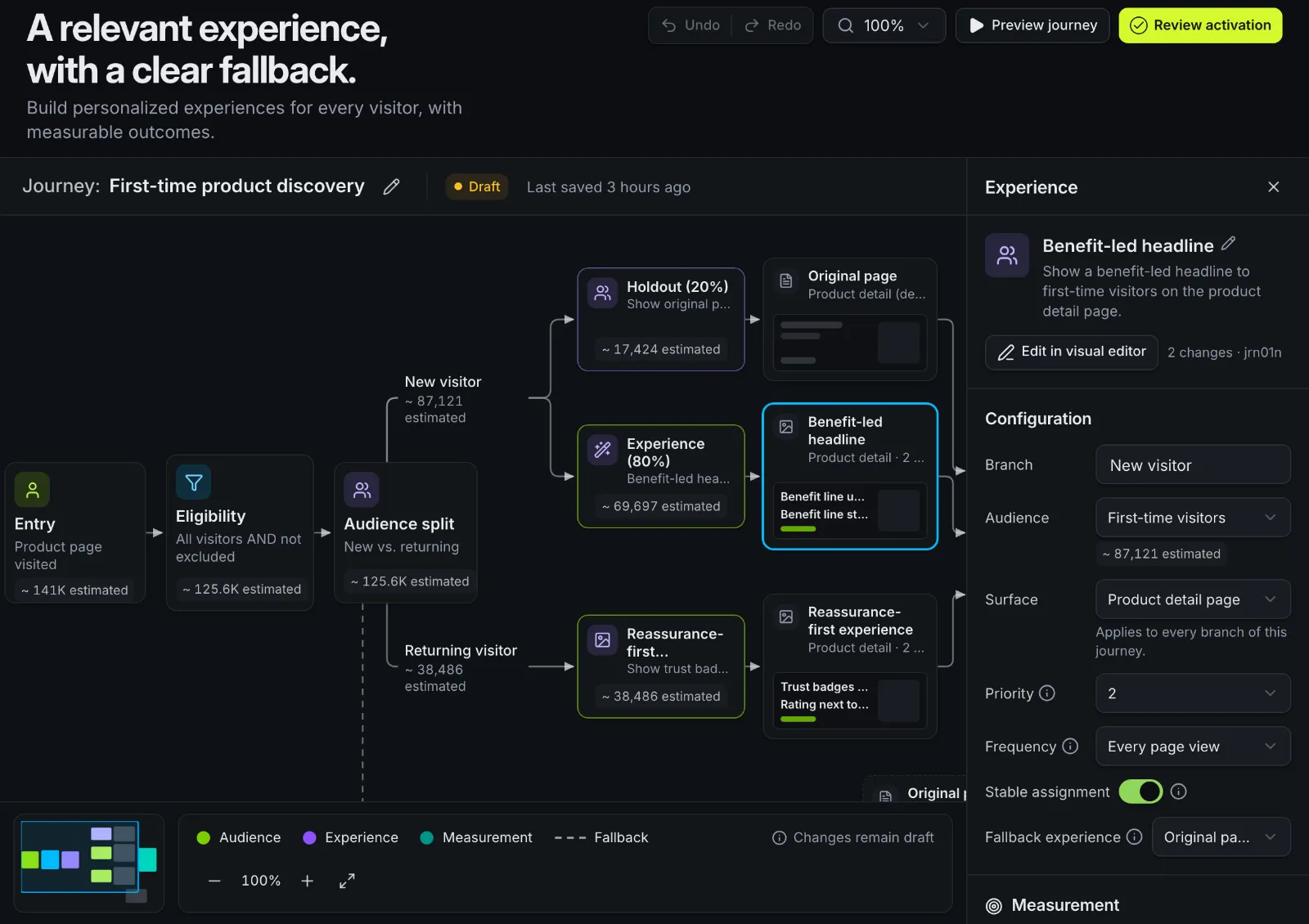
A personalized experience shows a version to everyone in an audience, without a randomized test. Keep a holdout share on the original page, and you still see what the experience changed.
Journeys lay out up to four audiences on one canvas, each with its own experience, priority and holdout, and a fallback for everyone else.
- Holdouts from 0% to 90% of the audience.
- When experiences overlap, the higher priority wins.
- Edit each experience in the visual editor, as for any test.
Keep tests from colliding
Mutually exclusive groups
Tests in a group never share a visitor. A live test keeps its share when a new one joins the group.
Priorities
Choose which experience wins when a visitor matches more than one.
Overlap view
See how much two audiences overlap before you launch against both.
Good to know
- Personalization is rules-based: you decide who sees what. One-to-one AI personalization isn't offered.
- Segments from outside CRMs such as Klaviyo or HubSpot aren't connected yet.
- Region and city come from the visitor's network location, so they're approximate.
Questions
Is a personalized experience a test?
Not on its own: it shows a version to everyone in the audience. Keep a holdout on the original page to measure the effect, or run an A/B test for that audience first.
Can I target Shopify Markets?
Yes. Location rules cover countries, regions, cities and Shopify Markets, and saved locations can be reused across tests.
Does targeting work with the server SDK?
Yes. The server SDK uses the same bucketing and targeting code as the storefront script, so a visitor gets the same answer in both when you pass the same details.
Different shoppers, different pages.
We'll look at your audiences with you and show journeys on demo data. Or install the Shopify app and build your first audience.