Find out if an app earns its place in your store.
Hold one app out for a share of visitors, such as a reviews widget, chat or a popup, and compare revenue per visitor, order value and conversion with and without it.
Do your apps cost you sales?
Every storefront app adds scripts and widgets. Each one promises more sales, and each one can also slow a page, cover a button or pull attention away from Add to cart. Most stores never check which way it goes.
The usual check is to turn an app off for a few weeks and compare with the weeks before. That mixes the app's effect with the season, your ads and your stock. An app impact test runs both at once: in the same weeks, randomly chosen visitors get the store without the app.
Testing tools usually handle this with a template or theme copy that leaves out the app's block. That can't remove an app embed, the kind of app code that loads on every page. Benchmyrk holds out the app itself, on every page, for the visitors in the holdout group.
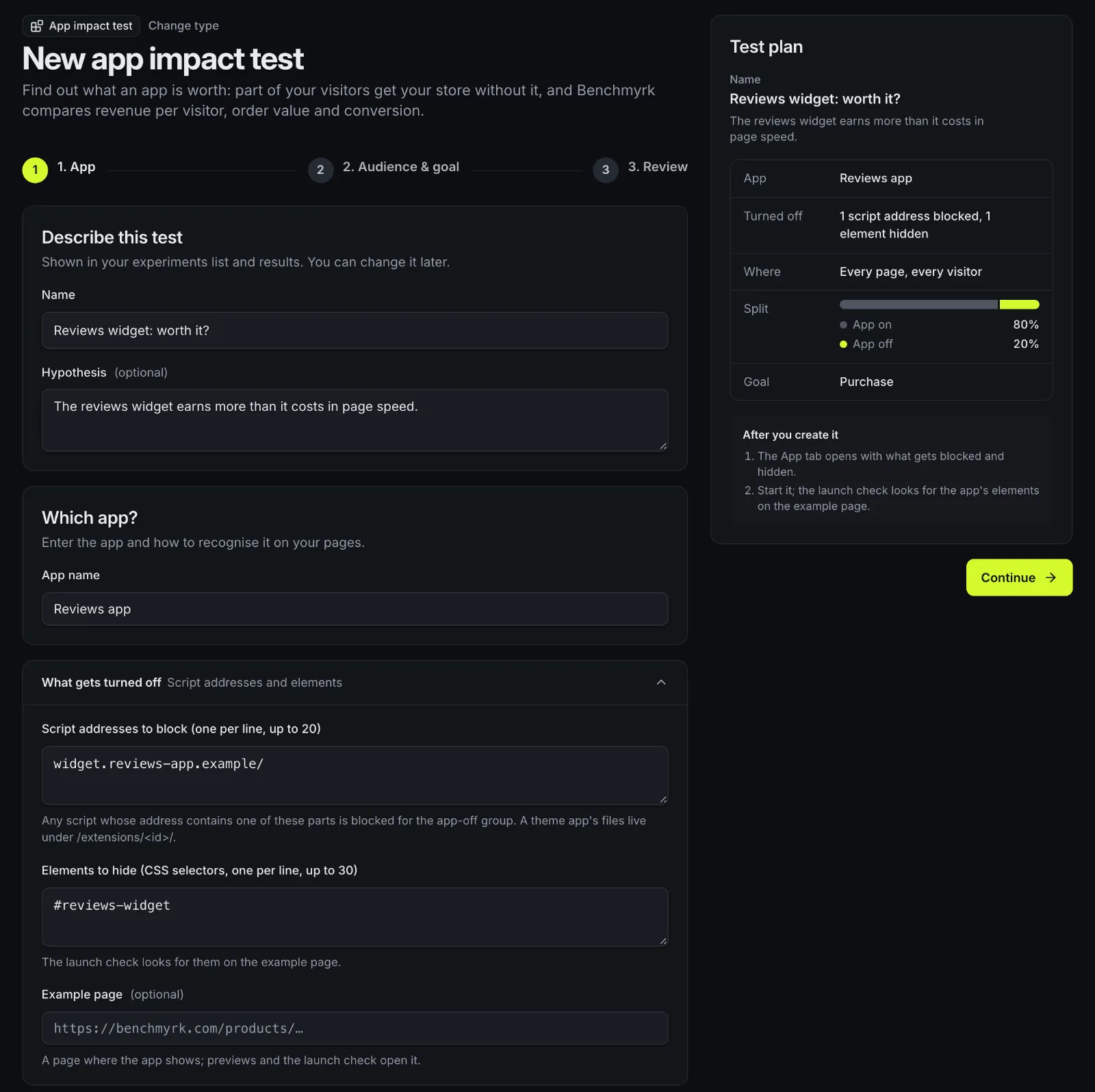
How an app is held out
The app stays installed and switched on in Shopify. Only the holdout group's browsers skip it.
Find the app
On Shopify, Benchmyrk reads your live theme and lists the app embeds and app blocks it uses, and suggests the app's script address and the element around each block. Check them on your storefront before launch. On other sites, enter the script address and elements yourself.
Two groups
"App on" is the control and keeps your store as it is. "App off" is the holdout group.
Before the app runs
A small script in Benchmyrk's app embed decides the visitor's group early in the page. For the holdout group it stops scripts whose address matches the app from running, and hides the app's elements.
Every page
The test covers every page, so a holdout visitor never meets the app on one page and misses it on the next.
Paid order
Conversion, revenue per visitor and order value are compared between the two groups, with the same statistics as every test.
| Step | What happens |
|---|---|
| Find the app | On Shopify, Benchmyrk reads your live theme and lists the app embeds and app blocks it uses, and suggests the app's script address and the element around each block. Check them on your storefront before launch. On other sites, enter the script address and elements yourself. |
| Two groups | "App on" is the control and keeps your store as it is. "App off" is the holdout group. |
| Before the app runs | A small script in Benchmyrk's app embed decides the visitor's group early in the page. For the holdout group it stops scripts whose address matches the app from running, and hides the app's elements. |
| Every page | The test covers every page, so a holdout visitor never meets the app on one page and misses it on the next. |
| Paid order | Conversion, revenue per visitor and order value are compared between the two groups, with the same statistics as every test. |
What can't be held out
Only the part of an app that runs in the shopper's browser on your storefront can be held out. Before you start, preview the "App off" group to check nothing else breaks without the app.
- Checkout and server-side parts keep running for everyone: checkout blocks, discount functions, post-purchase pages, emails, subscriptions and anything run from order webhooks.
- Scripts that load before Benchmyrk's app embed run for everyone, because Shopify doesn't promise an order between app embeds. The app's elements are still hidden.
- Code an app prints straight into the page, without a script address, isn't blocked. Its visible elements are hidden by their selectors.
- A first-time visitor joins the test from their second page, once the visitor id exists. That first contact with the app can make the measured effect a little smaller than the real one.
- Headless storefronts: hold an app out with a feature flag in your own code.
Which app to test first
Start with apps that show on product pages or interrupt shoppers. These are examples of tests to run, not results.
- 01
Example: a reviews widget
Stars and reviews on product pages. A widget that loads late or pushes Add to cart down can cost more than the reviews earn.
- 02
Example: a chat widget
A chat bubble on every page. Check that the help it gives outweighs the space it takes on phones.
- 03
Example: an email popup
Sign-ups can turn into orders weeks later. Judge it on revenue per visitor over a longer run, not on the first days.
- 04
Example: an upsell or bundle widget
Only its storefront part is held out. Watch order value next to conversion.
Reading the result
Results show revenue per visitor, order value and conversion with an interval for the difference. A clear drop without the app means the app pays its way in sales. No clear difference isn't proof the app does nothing: read the interval to see how large an effect could still hide in it.
Example: if holding an app out lowers revenue per visitor by $0.05 and your store has 40,000 visitors a month, the app brings in about $2,000 a month in revenue. Compare that, at your margin, with the app's monthly fee.
Example: at a 3% conversion rate, spotting a 10% relative change (3% to 3.3%) needs about 53,211 visitors per group, at 95% confidence and 80% power. Many apps move conversion by less, so plan with the sample size calculator and run full weeks.
Good to know
- Exactly two groups, app on and app off, on every page, without audiences or other targeting.
- On Shopify, the launch check confirms the app's embed is still on, or its block still placed, in your live theme.
- On other sites, put Benchmyrk's script tag before the app's script tags so it can stop them.
- Previews show the app's elements hidden; scripts are blocked for live visitors only.
- The app's own dashboard only sees visitors who got the app, so expect its numbers to fall while the test runs.
- App impact tests are new: checked in a real browser against a test page, not yet run on a live store.
Questions
Does an app impact test uninstall or turn off the app?
No. The app stays installed and switched on. Visitors in the holdout group don't load its storefront scripts and don't see its elements; everyone else gets the app as usual.
Which apps can I test?
Apps that add scripts or widgets to your storefront, such as reviews, chat, popups, badges and upsell widgets. Apps that only run in checkout or on Shopify's servers can't be held out.
Does it work without Shopify?
Yes. On other sites you enter the app's script address and the elements to hide yourself, and load the Benchmyrk script tag before the app's scripts.
How big should the holdout group be?
Big enough to reach a result in a few weeks. A 50/50 split is quickest. A smaller holdout, such as 20%, keeps the app for most shoppers but needs longer.
Check what your apps are worth.
We'll look at the apps on your store with you and pick the one most worth testing. Or install the Shopify app and start an app impact test.